

The Admin has it all!?
Yes, but did you know that the PayHere merchant account allows you to add team members?

You can add Finance, Customer Service and Technical team members, such that they can manage their tasks related to PayHere through their own user account instead of using the PayHere admin account.
To add a new Team Member, you can follow the steps below to grant them different access and authorization levels.
- Sign in to your PayHere Account.
- Go to the “Left Panel”.
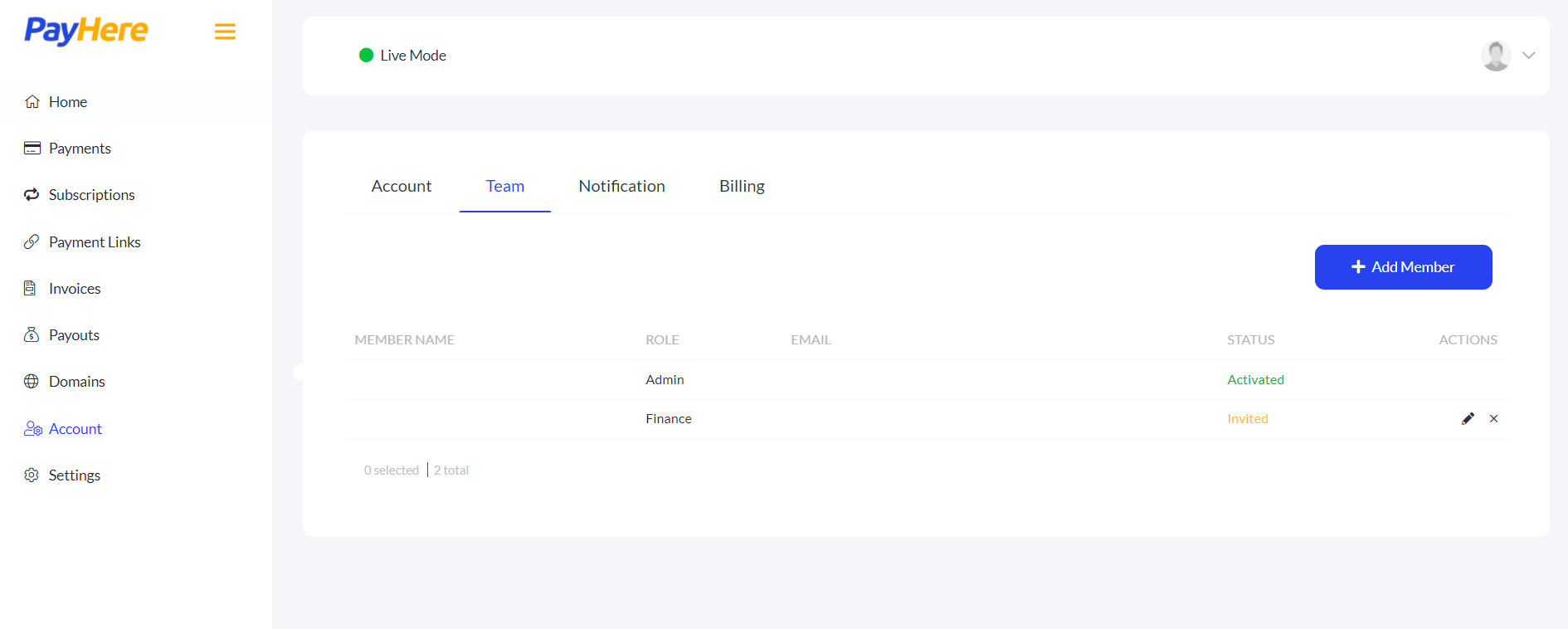
- Select “Account” from the left panel.
- Click on the “Team” tab and the section for adding members will be shown.
- Click on “Add Member” to add a new member.
-
- Enter the “First Name”.
- Enter the “Last Name”.
- Enter the “Email Address” of the team member.
- Select the most appropriate role: Finance, Customer Service or Technical.
- Click on “Add Member”.
Voila! Now the admin can rest!
Team Members can complete the online verification process and start using their own credentials for their work.
That’s the way to collab! Add now.


Wanna Collab? – PayHere Team Members – Sasithi Rambukkanage
[…] the original at: Wanna Collab? – PayHere Team Members – Payhere Blog [Original graphics for this article are also by Sasithi […]